

Intercom
This data source connector fetches data from Intercom.
Configuration
Section titled “Configuration”Before you start, have a working Intercom account with a plan (a trial will work as well). Create a new configuration of the Intercom connector. Then click Authorize Account to authorize the configuration.
Choose one of the configuration templates available: Basic or Conversations and Save the configuration. You can also switch to the JSON editor.
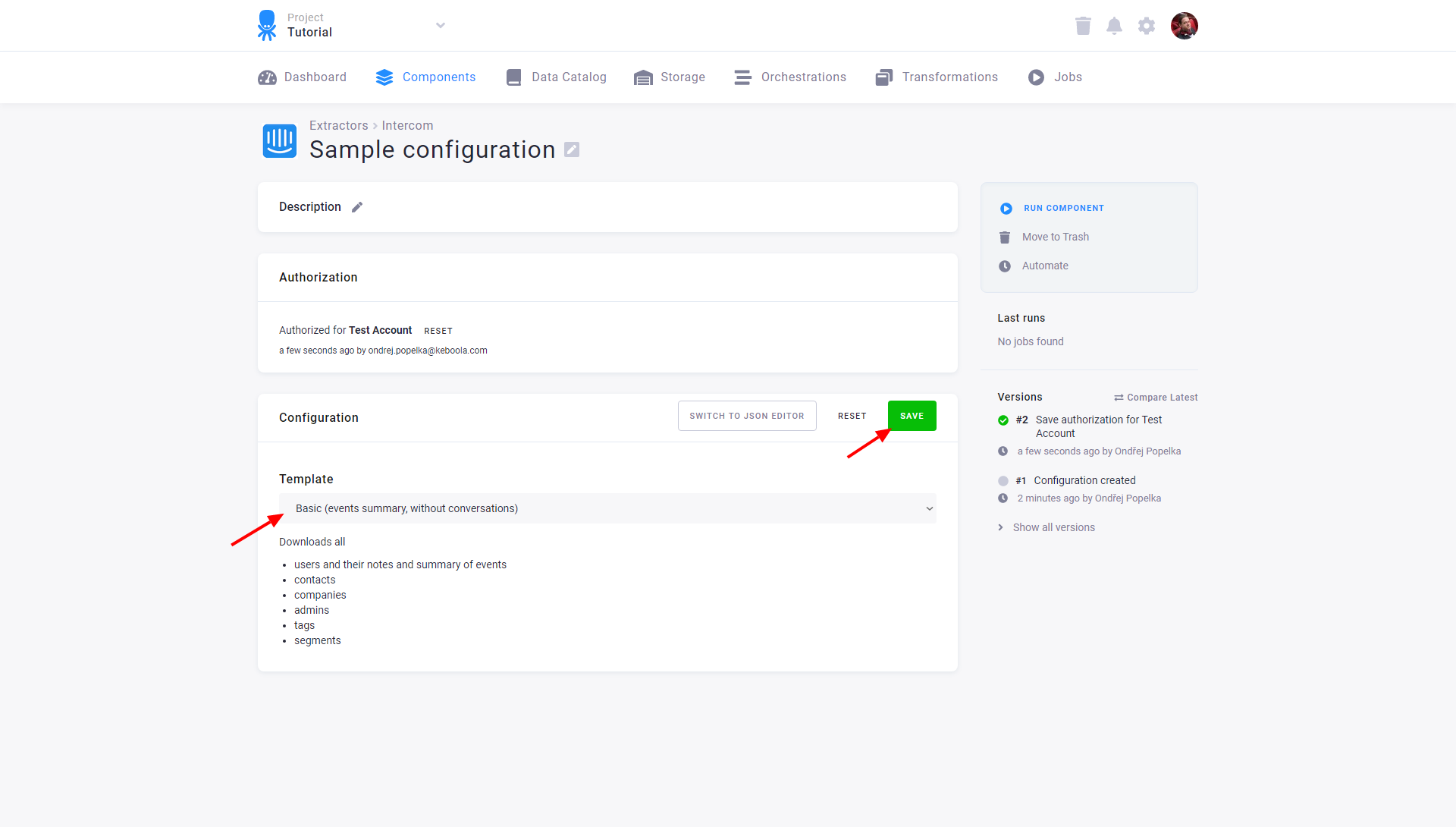
The basic template downloads all
- users (tables
users,users_tags,users_segments,users_companiesandusers_social_profiles) - notes (table
notes) - summary of events for each user (table
events_summary) - leads (tables
leads,leads_tags,leads_segments,leads_companiesandleads_social_profiles) - companies (table
companies) - admins (table
admins) - tags (table
tags) - segments (table
segments)
Conversations
Section titled “Conversations”The conversations template downloads all
- conversations (tables
conversations,conversations_attachments,conversations_tagsandconversations_customers) - conversation parts (tables
conversation_partsandconversation_parts_attachments)
Downloaded Tables
Section titled “Downloaded Tables”All custom_attributes and metadata properties are stored as a serialized JSON string.
Due to the customized structure of this object we are unable to prepare a fixed structure.
To parse the serialized JSON, use, for example, a Snowflake transformation that can easily parse JSON objects.
The table users lists all Users and
has the following columns:
| Column | Description |
|---|---|
type | Value is user |
id | The Intercom defined id representing the user |
created_at | The time the user was added to Intercom |
signed_up_at | The time the user signed up |
updated_at | The last time the user was updated |
email | The email you have defined for the user |
phone | The phone number of the user |
user_id | The user id you have defined for the user |
last_request_at | The time the user last recorded making a request |
session_count | How many sessions the user has recorded |
unsubscribed_from_emails | Whether the user is unsubscribed from emails |
marked_email_as_spam | Undocumented |
has_hard_bounced | Undocumented |
user_agent_data | Data about the last user agent the user was seen using |
last_seen_ip | An ip address (e.g. “1.2.3.4”) representing the last ip address the user visited your application from. (Used for updating location_data) |
pseudonym | The pseudonym used if this user was previously a Lead |
anonymous | Whether or not this is a Lead. Always false |
name | The full name of the user |
location_data_city_name | A city name |
location_data_continent_code | A continent code |
location_data_country_code | An ISO 3166 country code |
location_data_country_name | The country name |
location_data_latitude | The latitude |
location_data_longitude | The longitude |
location_data_postal_code | A postal code |
location_data_region_name | A region name |
location_data_timezone | An ISO 8601 timezone |
avatar_image_url | An avatar image URL |
custom_attributes | Serialized JSON of all custom attributes for the user object |
users_tags
Section titled “users_tags”This table records relations between users and tags.
| Column | Description |
|---|---|
type | Value is tag |
id [FK] | Tag identifier (tags.id) |
users_pk [FK] | User identifier (users.id) |
users_segments
Section titled “users_segments”This table records relations between users and segments.
| Column | Description |
|---|---|
type | Value is segment |
id [FK] | Segment identifier (segments.id) |
users_pk [FK] | User identifier (users.id) |
users_companies
Section titled “users_companies”This table records relations between users and companies.
| Column | Description |
|---|---|
type | Value is company |
id [FK] | Company identifier (companies.id) |
users_pk [FK] | User identifier (users.id) |
users_social_profiles
Section titled “users_social_profiles”This table lists social profiles attached to the user.
| Column | Description |
|---|---|
type | Value is social_profile |
id | User ID on the service |
name | The name of the service (e.g., twitter, facebook) |
username | User name or handle on the service |
url | The user homepage on the service |
users_pk [FK] | User identifier (users.id) |
This table lists all Notes.
| Column | Description |
|---|---|
type | Value is note |
id [PK] | The id representing the note |
created_at | The time the note was created |
body | The body text of the note |
user_type | The user type the note was created about, usually user |
user_id [FK] | The user id the note was created about |
author_type | Represents the Admin type that created the note, usually admin |
author_id [FK] | Represents the Admin id that created the note |
events_summary
Section titled “events_summary”This table lists Event Summaries for each user.
| Column | Description |
|---|---|
user_id [FK] | The user id |
name | Event name |
count | Event count |
first | Time of first event |
last | Time of last event |
description | Event description |
This table lists Leads.
| Column | Description |
|---|---|
type | Value is contact |
id | The Intercom defined id representing the Lead |
created_at | The time the Lead was added to Intercom |
updated_at | The last time the Lead was updated |
user_id | Automatically generated identifier for the Lead |
email | The email you have defined for the Lead |
name | The name of the Lead |
phone | The phone number you have defined for the lead |
anonymous | Undocumented |
pseudonym | Undocumented |
last_request_at | The time the Lead last recorded making a request |
unsubscribed_from_emails | Whether the Lead is unsubscribed from emails |
location_data_city_name | A city name |
location_data_continent_code | A continent code |
location_data_country_code | An ISO 3166 country code |
location_data_country_name | The country name |
location_data_latitude | The latitude |
location_data_longitude | The longitude |
location_data_postal_code | A postal code |
location_data_region_name | A region name |
location_data_timezone | An ISO 8601 timezone |
avatar_image_url | An avatar image URL |
user_agent_data | Data about the last user agent the Lead was seen using |
last_seen_ip | An ip address (e.g. “1.2.3.4”) representing the last ip address the Lead visited your application from |
remote_created_at | Undocumented |
signed_up_at | Undocumented |
session_count | Undocumented |
marked_email_as_spam | Undocumented |
has_hard_bounced | Undocumented |
custom_attributes | Serialized JSON of all custom attributes for the Leads object |
leads_tags
Section titled “leads_tags”This table records relations between leads and tags.
| Column | Description |
|---|---|
type | Value is tag |
id [FK] | Tag identifier (tags.id) |
leads_pk [FK] | Lead identifier (leads.id) |
leads_segments
Section titled “leads_segments”This table records relations between leads and segments.
| Column | Description |
|---|---|
type | Value is segment |
id [FK] | Segment identifier (segments.id) |
leads_pk [FK] | Lead identifier (leads.id) |
leads_companies
Section titled “leads_companies”This table records relations between leads and companies.
| Column | Description |
|---|---|
type | Value is company |
id [FK] | Company identifier (companies.id) |
leads_pk [FK] | Lead identifier (leads.id) |
leads_social_profiles
Section titled “leads_social_profiles”This table lists the social profiles attached to all users.
| Column | Description |
|---|---|
type | Value is social_profile |
id | User ID on the service |
name | The name of the service (e.g., twitter, facebook) |
username | User name or handle on the service |
url | The user homepage on the service |
leads_pk [FK] | Lead identifier (leads.id) |
companies
Section titled “companies”This table lists all Companies.
| Column | Description |
|---|---|
type | Value is company |
id [PK] | The Intercom defined id representing the company |
created_at | The time the company was added to Intercom |
remote_created_at | The time the company was created by you |
updated_at | The last time the company was updated |
company_id | The company id you have defined for the company |
name | The name of the company |
session_count | How many sessions the company has recorded |
monthly_spend | How much revenue the company generates for your business |
user_count | The number of users in the company |
plan | The name of the plan you have associated with the company |
custom_attributes | Serialized JSON of all custom attributes for the Company object |
admins
Section titled “admins”This table lists all Admins.
| Column | Description |
|---|---|
type | Value is admin or team |
id [PK] | The id of the admin or team |
name | The name of the admin or team |
email | The email address of the admin. This attribute is null for teams |
This table lists all Tags.
| Column | Description |
|---|---|
type | Value is tag |
id [PK] | The id of the tag |
name | The name of the tag |
segments
Section titled “segments”This table lists all Segments.
| Column | Description |
|---|---|
type | Value is segment |
id [PK] | The id representing the segment |
name | The name of the segment |
created_at | The time the segment was created |
updated_at | The time the segment was updated |
count | The number of items in the segment |
person_type | Type of the record: user or lead |
conversations
Section titled “conversations”This table lists all Conversations.
| Column | Description |
|---|---|
type | Value is conversation |
id [PK] | The id representing the conversation |
created_at | The time the conversation was created |
updated_at | The last time the conversation was updated |
waiting_since | The last time a customer responded to an admin. In other words, the time a customer started waiting for a response. |
snoozed_until | If set this is the time in the future when this conversation will be marked as open. i.e. it will be in a snoozed state until this time |
user_type | The user type the conversation concerns |
user_id | The user id the conversation concerns |
assignee_type | The admin type the conversation is currently assigned to |
assignee_id | The admin id the conversation is currently assigned to. Note nobody_admin indicates the conversation is assigned to Nobody. |
conversation_message_type | value is conversation_message |
conversation_message_id | The id representing the message |
conversation_message_subject | The message subject |
conversation_message_body | The message body (plaintext) |
conversation_message_author_type | The Admin type that created the message |
conversation_message_author_id | The Admin id created the message |
conversation_message_url | The URL the User started a conversation on |
open | Indicates whether a conversation is open (true) or closed (false) |
read | Indicates whether a conversation has been read |
state | Can be set to open, closed or snoozed. |
conversations_attachments
Section titled “conversations_attachments”This table lists all attachments for all conversations.
| Column | Description |
|---|---|
type | Undocumented |
name | Undocumented |
url | Undocumented |
content_type | Undocumented |
filesize | Undocumented |
width | Undocumented |
height | Undocumented |
conversations_pk [FK] | Conversation identifier (conversations.id) |
conversations_customers
Section titled “conversations_customers”This table lists all customers (users or leads) involved in each conversation.
| Column | Description |
|---|---|
type | user or conversation (lead) |
id | User or Lead id |
conversations_pk [FK] | Conversation identifier (conversations.id) |
conversations_tags
Section titled “conversations_tags”This table records relations between conversations and tags.
| Column | Description |
|---|---|
type | Value is tag |
id [FK] | Tag identifier (tags.id) |
conversations_pk [FK] | Conversation identifier (conversations.id) |
conversation_parts
Section titled “conversation_parts”This table lists all Conversation parts.
| Column | Description |
|---|---|
type | Value is conversation_part |
id [PK] | The id representing the conversation part |
part_type | The type of conversation part |
body | The body of the comment |
created_at | The time the conversation part was created |
updated_at | The last time the conversation part was updated |
notified_at | The time the user was notified with the conversation part |
assigned_to_type | The type of the admin that the conversation is assigned to |
assigned_to_id | The ID of the admin that the conversation is assigned to (not null only when part_type: assignment) |
author_type | The user or admin type that created the part |
author_id | The user or admin id that created the part |
external_id | Undocumented |
conversation_parts_attachments
Section titled “conversation_parts_attachments”This table lists all attachments for each conversation part.
| Column | Description |
|---|---|
type | Undocumented |
name | Undocumented |
url | Undocumented |
content_type | Undocumented |
filesize | Undocumented |
width | Undocumented |
height | Undocumented |
conversation_parts_pk [FK] | Conversation identifier (conversation_parts.id) |